
By Priyank Venkatesh
Estimated reading time: 5 minutes

Why reading P&IDs takes so much time
What feeds this pump, and where does its discharge go? On a piping and instrumentation diagram (P&ID), answering that question can mean following a line to an off-page connector, finding the referenced drawing, and picking up the route again. A single route may take an engineer through several pages of PDFs.
Each page means matching references and keeping track of branches. Faded scans make tags harder to read. Crisp vector PDFs improve clarity, but engineers still have to piece together the route. Repeating that work takes time away from assessing the process.
These PDFs often arrive through handovers between different CAD systems. For plant managers, the lasting issue is the time engineers spend finding and checking connections whenever those drawings are used for maintenance planning or a reliability review.
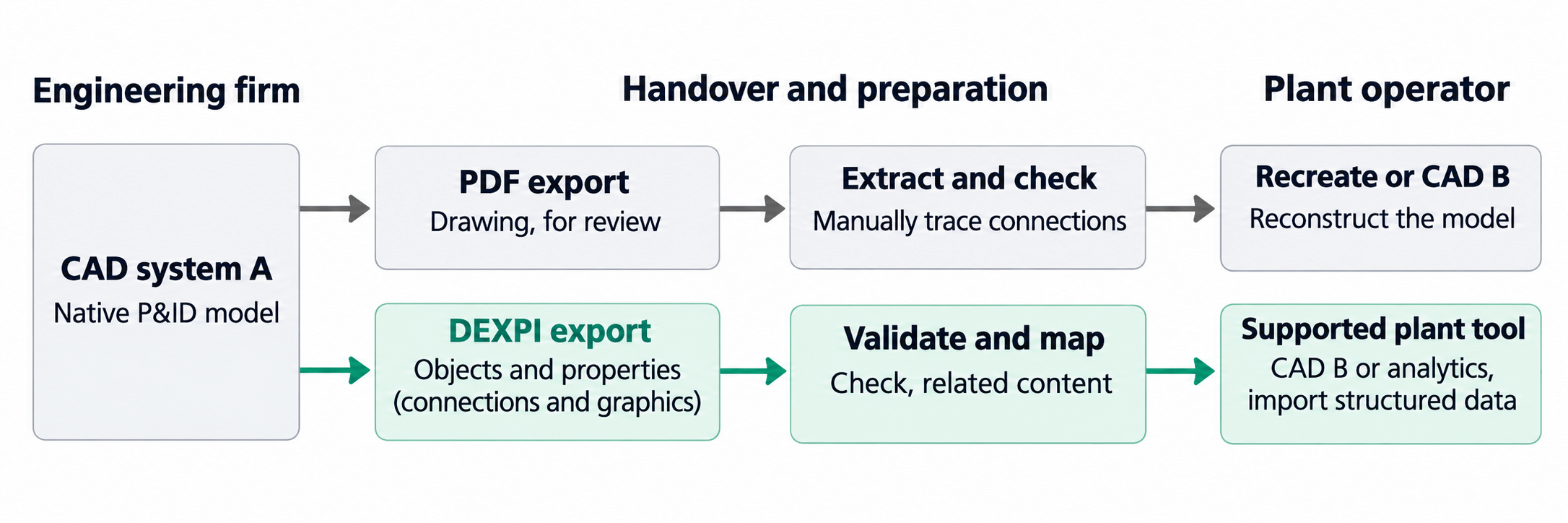
PDF review and data reconstruction compared with DEXPI export, validation, and structured import. [4]
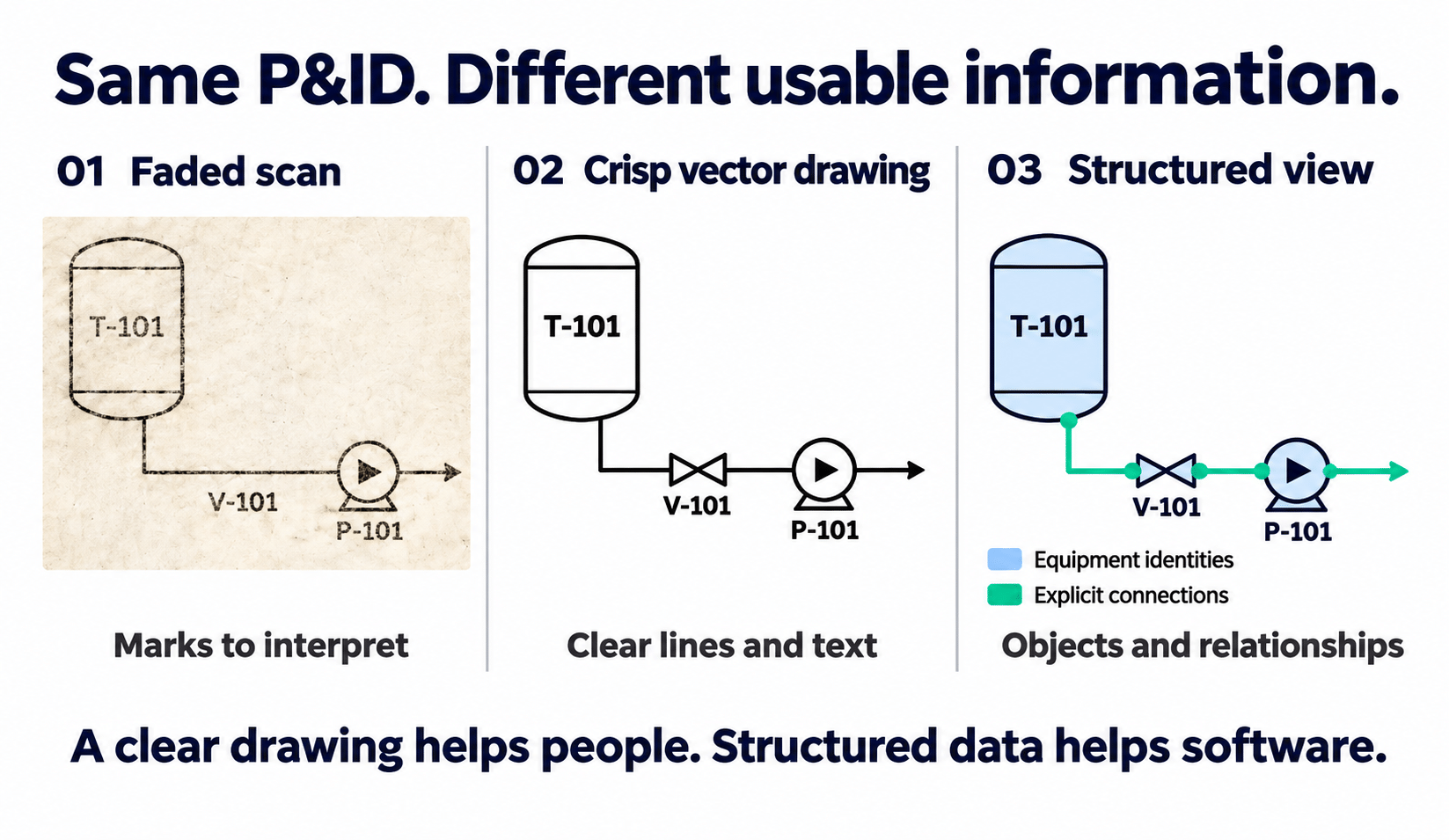
Searchable text and hyperlinks can help engineers navigate a PDF. They do not necessarily tell another engineering application which objects are pumps, what their properties mean, or how they connect.
What DEXPI carries
DEXPI stands for Data Exchange in the Process Industry. It defines a shared, vendor-agnostic way to describe engineering information and exchange it between applications. A receiving tool can work with identifiable equipment, its properties, and its connections, as well as diagram graphics. That gives software a basis for helping engineers trace a process and reuse the information in other tasks, provided the required data is included and supported. [1, 2, 5]
DEXPI also gives plant owners more freedom to choose their software. Exchanging equipment and connection data in a shared format reduces dependence on the CAD system that created it. Engineers can reuse that information in compatible tools for tracing and analysis, while plant managers retain more flexibility when changing suppliers or systems. The practical benefit depends on what each tool can import and export. [5]
A successful exchange still depends on compatible import and export support, appropriate mappings, and reliable source data. For a trace to continue across drawings, the corresponding off-page connections also need to be correctly identified and linked.
Take a tank connected through a valve to a pump. A DEXPI exchange can represent the components as identifiable objects and describe their connections. Receiving software then has a structure it can use.
The excerpts below use the older Proteus XML format used for DEXPI exchanges before DEXPI 2.0. They are adapted from the sample P&ID, with the pump tag changed to match the diagram. DEXPI 2.0 introduced a different format called DEXPI XML. [3, 5]
<Equipment ID=”CentrifugalPump-1″
ComponentClass=”CentrifugalPump”>
<GenericAttributes Set=”DexpiAttributes”>
<GenericAttribute
Name=”TagNameAssignmentClass”
Format=”string” Value=”P-101″/>
</GenericAttributes>
</Equipment>
<Connection
FromID=”Nozzle-2″ FromNode=”1″
ToID=”Nozzle-3″ ToNode=”1″/>
Identifies the pump. The equipment has an identity, a defined type, and the plant tag P-101.
References connected points. Within a piping network segment, the connection uses IDs and node numbers to refer to points defined elsewhere in the file.
Older Proteus XML excerpts; additional attributes, elements, and enclosing context omitted.
Working with existing drawings
If your starting point is a faded scan, someone still needs to resolve unreadable tags and uncertain connections. If the drawing is outdated, it still needs checking against the plant. Putting information into a structured format makes it easier to use; it doesn’t automatically make it accurate.
From DEXPI exchange to Process Insights
UReason’s Process Insights uses DEXPI equipment and connection data to help engineers trace a process and explore how its components fit together.
For our pump example, an engineer can trace what feeds the pump, follow downstream connections, and investigate which connected equipment could be affected by a failure. The connection data provides a starting point for the review, reducing the need to reconstruct the route from static drawings.
For plant managers, the practical benefit is less engineering time spent finding and reconstructing routes before they can be assessed. Teams can use that process context to support maintenance planning and reliability reviews. A connection trace alone does not establish that equipment is safely isolated; engineering review remains essential. Read our blog post on Process Insights to explore how engineering data supports process understanding.
Further reading
[1] Official DEXPI introduction
[2] DEXPI P&ID specification and exchange objectives
[3] XML sample: C01V04-VER.EX01.xml. The header reports application version 1.3.1 and XML schema version 4.1.1. These are file metadata. The excerpts use the older Proteus XML format, rather than the DEXPI XML format introduced in DEXPI 2.0. The pump tag has been adapted to P-101.
[4] CADMATIC DEXPI import and export requirements
[5] DEXPI 2.0 announcement and vendor independence
Turn Structured P&ID Data into Actionable Insights
Book a call with Priyank Venkatesh to explore how UReason Process Insights uses structured engineering data to trace equipment connections, understand process relationships, and support more efficient troubleshooting and reliability analysis.