Processing Rules in APM Studio allow you to extract data, diagnose issues, and execute custom mathematical models using a visual flow diagram. This short tutorial demonstrates how to configure a continuous looping rule that executes a custom JavaScript algorithm. In this example, the script calculates the Remaining Useful Life (RUL) of a rotating asset based on vibration degradation and assigns the result to an output variable.
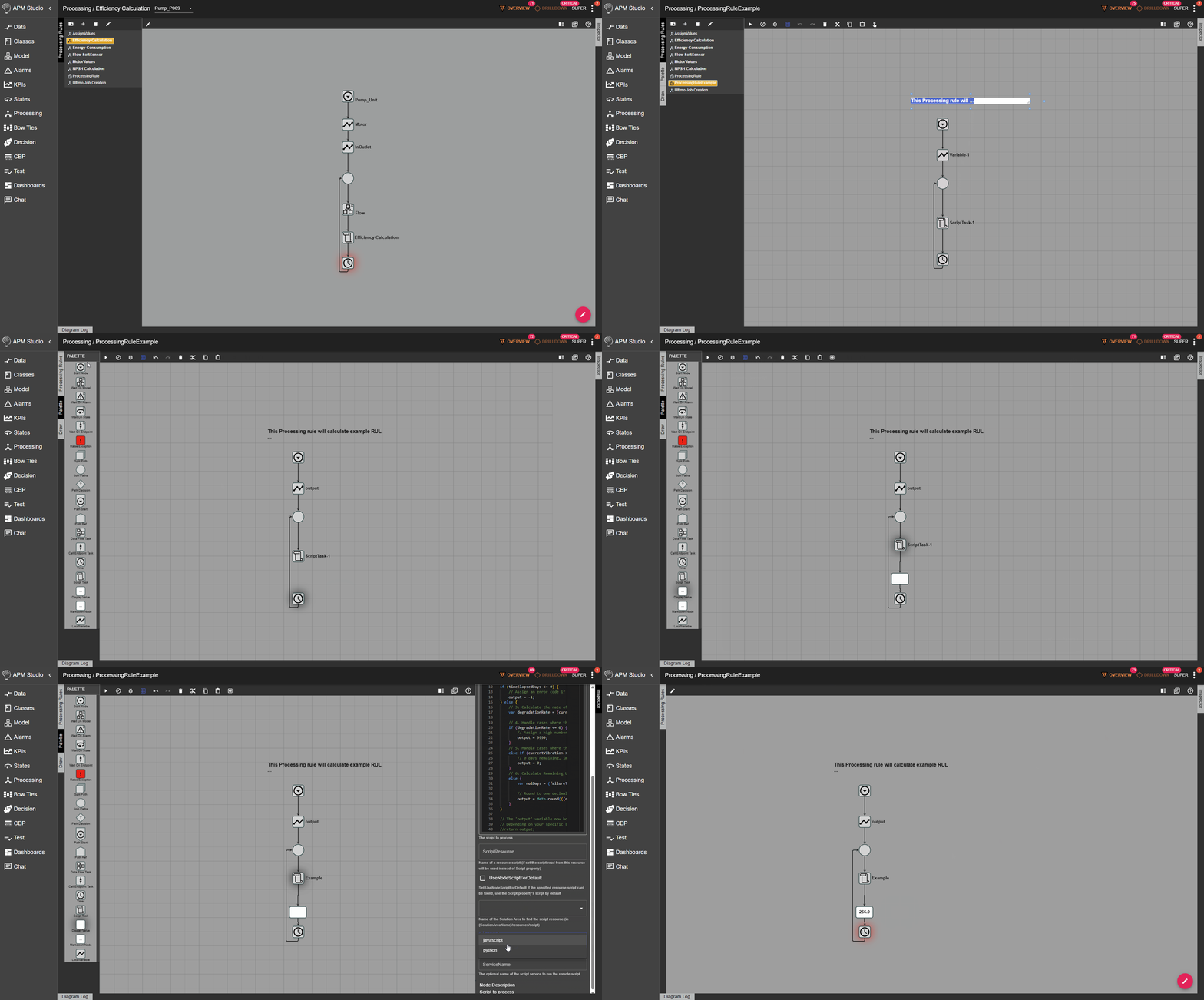
Click on the image to view it in full resolution.
The tutorial shows:
- The creation of a new Processing Rule from a standard template.
- The configuration of a looping execution flow using the Start Block properties.
- The integration of custom JavaScript predictive maintenance logic within a Script Task Block.
- The assignment of the calculated RUL value to an output property for dashboard monitoring.
Background information on Processing Rules
A Processing Rule provides a highly flexible graphical programming language. By representing a processing flow visually, it is much easier for engineering teams to understand the underlying logic without needing to parse thousands of lines of code. All Processing Rules begin with a Start Node and use connected blocks to dictate the flow of execution.
The behaviour of a Processing Rule is typically looping. This loop is driven by changes in asset states, fluctuating property values, alarms, or a defined iteration period.
While you can implement complex processing using predefined blocks, it is often necessary to program specific procedural functions. The Script Task Block allows you to run full JavaScript or Python directly inside the Processing Rule. This is highly useful for predictive maintenance applications. It allows you to drop in custom algorithms, such as linear degradation calculations, to update model object properties and local variables in real time.
Benefits of using Processing Rules in APM Studio APM Studio State Diagram Elements
Using Processing Rules in APM Studio empowers engineering teams to extract, refine, and act upon asset data without needing to write complex software applications from scratch. Because the logic is built using a visual flow diagram, it is much easier for operators and maintenance professionals to understand exactly how a decision is being made or a calculation is being performed.
This graphical approach minimises the need for extensive coding, whilst still offering the flexibility to embed custom JavaScript or Python scripts for highly specific analytical tasks—such as the Remaining Useful Life algorithm shown in this tutorial. Ultimately, Processing Rules allow you to seamlessly combine live sensor data, mathematical models, external web services, and asset behaviour to automatically diagnose issues, trigger alerts, and prevent unplanned downtime.
Want expert guidance for your APM Studio configuration?
Book a call with Artur Loorpuu, Senior Solutions Engineer in Digitalization. Artur specialises in turning industrial challenges into practical digital solutions through expertise in predictive maintenance, digital twins, data science, and strategic product management.
Let’s explore how we can support your goals!